Frequently Asked Questions
Common questions about Hyper-Extract.
General
What is Hyper-Extract?
Hyper-Extract is an LLM-powered knowledge extraction framework that transforms unstructured text into structured knowledge graphs, lists, models, and more.
What can I use it for?
- Research paper analysis
- Knowledge base construction
- Document processing
- Information extraction
- Question-answering systems
Is it free?
The software is open-source (Apache-2.0). You need an API key from a supported LLM provider (OpenAI, Anthropic, DeepSeek, Alibaba Bailian, or local vLLM).
Installation
What are the requirements?
- Python 3.11+
- An API key from any supported provider (OpenAI, Anthropic, DeepSeek, Bailian, or local vLLM)
How do I install it?
Installation fails with "No module named 'hyperextract'"
Try:
Or use a virtual environment:
python -m venv venv
source venv/bin/activate  # Windows: venv\Scripts\activate
pip install hyperextract
Configuration
Where do I set my API key?
Option 1: CLI
# OpenAI / Bailian (one-step)
he config init -p openai -k YOUR_API_KEY
he config init -p bailian -k YOUR_API_KEY

# Anthropic / DeepSeek (LLM + separate embedder)
he config llm -p deepseek -k YOUR_DEEPSEEK_API_KEY
he config embedder -p openai -k YOUR_OPENAI_API_KEY
Option 2: Environment variable
export OPENAI_API_KEY=your-api-key        # OpenAI/Bailian
export ANTHROPIC_API_KEY=your-api-key     # Anthropic
export DEEPSEEK_API_KEY=your-api-key      # DeepSeek
Option 3: .env file
Can I use a different LLM provider?
Yes! Hyper-Extract supports OpenAI, Anthropic, DeepSeek, Alibaba Bailian, and local vLLM out of the box:
# OpenAI / Bailian
he config init -p openai -k YOUR_API_KEY

# DeepSeek / Anthropic (LLM only, pair with OpenAI embedder)
he config llm -p deepseek -k YOUR_DEEPSEEK_API_KEY
he config embedder -p openai -k YOUR_OPENAI_API_KEY
For custom OpenAI-compatible endpoints:
See Provider System for the full compatibility list.
Which models are supported?
- OpenAI: gpt-4o, gpt-4o-mini, gpt-5
- Anthropic: claude-opus-4-8, claude-sonnet-4-6, claude-haiku-4-5
- DeepSeek: deepseek-v4-flash, deepseek-v4-pro
- Alibaba Bailian: qwen-plus, qwen-turbo, qwen3.6-plus
- Local vLLM: Any model served via vLLM (e.g. Qwen/Qwen3.5-9B)
See Provider System for the full compatibility table.
Usage
Which template should I use?
See the How to Choose guide or use:
How do I process a PDF?
Feed it directly (requires the optional ingest extra — also supports Word, PowerPoint, Excel, HTML, EPUB and more):
Scanned (image-only) PDFs have no text layer — run OCR first. See he parse for the full format table.
Can I process multiple documents?
Option 1: Feed incrementally
Option 2: Process directory
How do I extract in Chinese?
How do I delete knowledge from an existing KA?
# Hard-delete a node (edges anchored by it are removed too)
he remove ./ka/ --node Apple

# Soft-remove one wrong/obsolete fact, keeping the rest of the node
he remove ./ka/ --edit-node Apple --fact "founded by Steve Jobs" --dry-run
he remove ./ka/ --edit-node Apple --fact "founded by Steve Jobs" -y
Soft delete uses the LLM to rewrite the item under the same schema, with a key-invariance check and an automatic data.json backup. To delete everything a specific document contributed, rebuild the KA without that document — per-document provenance tracking is not implemented yet. See he remove.
Performance
Why is extraction slow?
- Long documents are chunked and processed in parallel
- Each chunk requires an LLM call
- Consider using
--no-indexduring batch processing
How can I speed it up?
- Use smaller chunk sizes
- Reduce
max_workersif hitting rate limits - Process documents in parallel (manually)
Memory issues with large documents?
Process in smaller batches:
Results
Where is my data stored?
./output/
├── data.json      # Extracted knowledge
├── metadata.json  # Extraction info
└── index/         # Search index
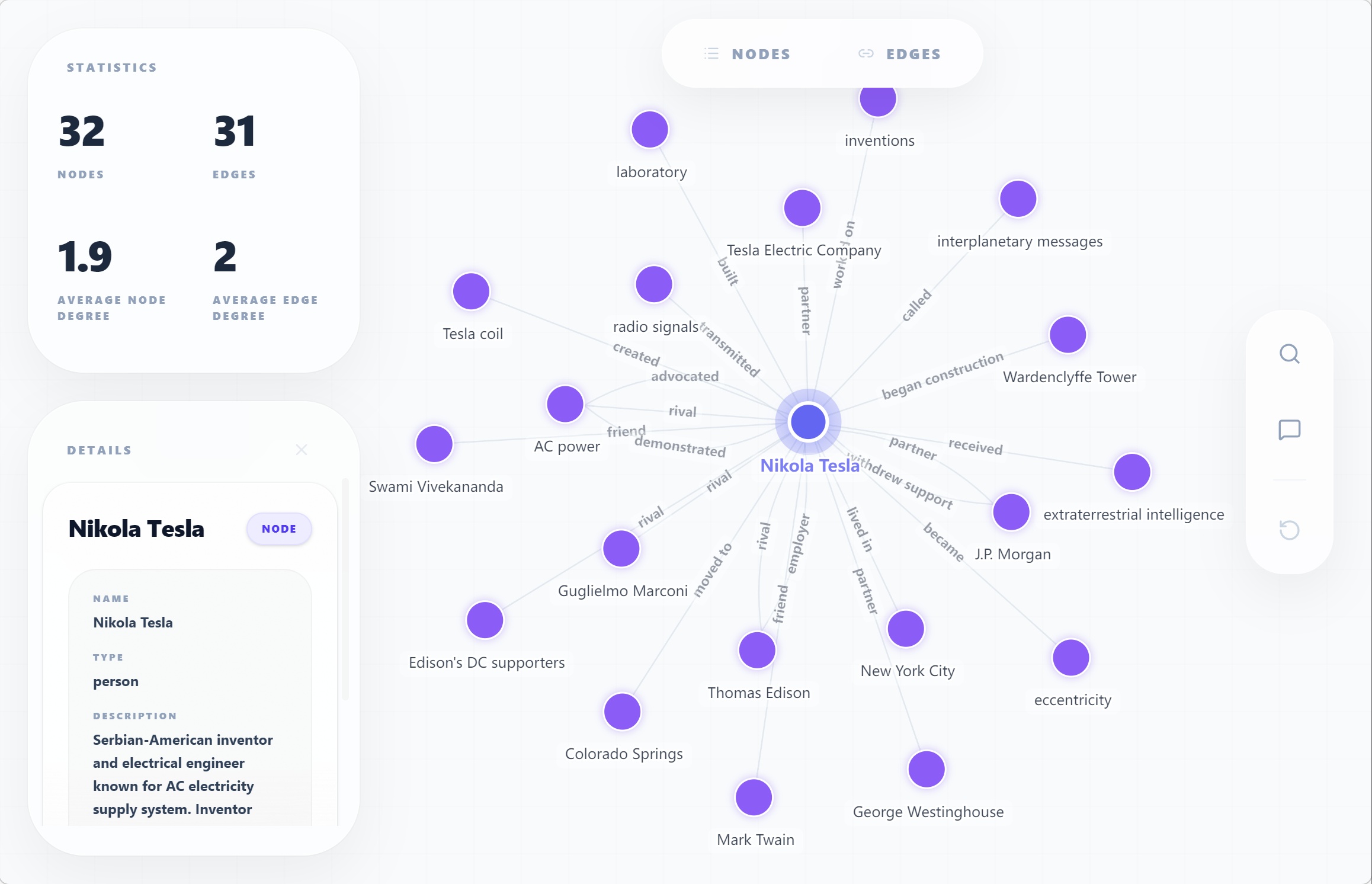
How do I visualize results?
Or in Python:
Can I export to other formats?
import json

# To JSON
json_data = result.data.model_dump_json()

# To dict
data_dict = result.data.model_dump()
Troubleshooting
"API key not found"
# Specify your provider
he config init -p openai -k YOUR_API_KEY
# or: -p bailian, -p deepseek, etc.
"Template not found"
List available templates:
"Index not found" error
Build the index:
Search returns no results
Try:
- Different search terms
- Increase top_k: he search ./ka/ "query" -n 10
- Check if index is built: he info ./ka/
Advanced
Can I create custom templates?
Yes! See Custom Templates.
Can I use my own extraction method?
Yes, implement and register:
from hyperextract.methods import register_method

class MyMethod:
    def extract(self, text):
        # Your logic
        pass

register_method("my_method", MyMethod, "graph", "Description")
How do I integrate with my application?
from hyperextract import Template

class MyApp:
    def __init__(self):
        self.ka = Template.create("general/graph", "en")

    def process_document(self, text):
        return self.ka.parse(text)